
There are two ways access may have been configured: through GDAP or via app-based onboarding.
-
GDAP onboarding: The relationship between Attic and the tenant needs to be terminated. Click here for instructions on how to end the GDAP relationship.
-
App-based onboarding: The Attic app must be manually removed from the Entra environment to fully revoke access. Click here for instructions on how to delete the app.
Steps to Terminate the GDAP Relationship
- Go to the Microsoft Admin Center (Direct link)
- Sign in as an administrator
- Navigate to Settings > Partner relationsships
- Select the relevant partner and GDAP relationship (Zolder/Attic)
- Remove the assigned roles from the relationship
- Now naviate to https://entra.microsoft.com/#view/Microsoft_AAD_IAM/StartboardApplicationsMenuBlade/~/AppAppsPreview
- Deselect "Application type == Enterprise applications"
- Search for "[Attic] Client Access App" and click it.
- Navigate to properties.
- Click delete.
What happens after removal?
-
Once the roles are removed from the GDAP relationship, access for Zolder/Attic is immediately revoked.
-
We are also notified that the GDAP relationship is no longer valid.
Steps to remove App-Based Access
- Go to the Microsoft Admin Center (Direct link)
- Sign in as an administrator
- Entra ID > Enterprise apps
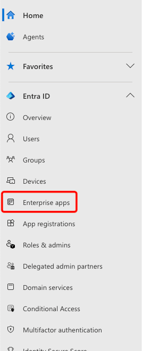
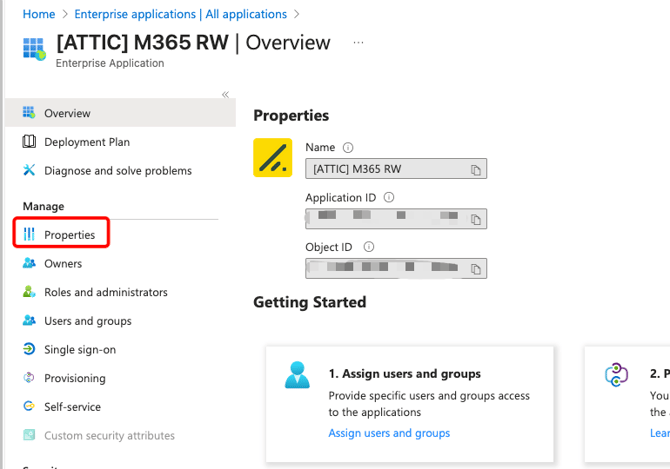
- Search for [ATTIC] and select the app

- Ga naar Properties
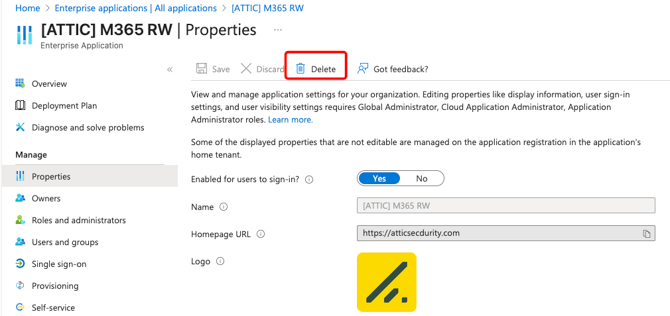
- Select Delete
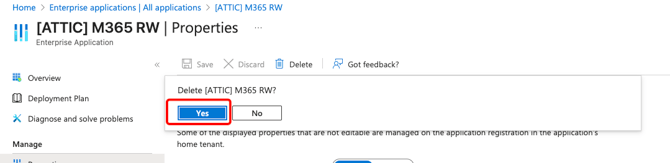
- Select Yes
What happens after removal
Once the app has been removed, we no longer have access to the tenant.
If you have any questions or encounter any issues during this process, please contact our supportteam